Balance the whole image, by tonal range
Primary
The primary corrector — three wheels that push color and level into your shadows, mids, and highlights. Lift, Gamma, Gain: the foundational balance every creative move builds on.
Lift, Gamma, Gain
Color and level pushed into the shadows, mids, and highlights independently.
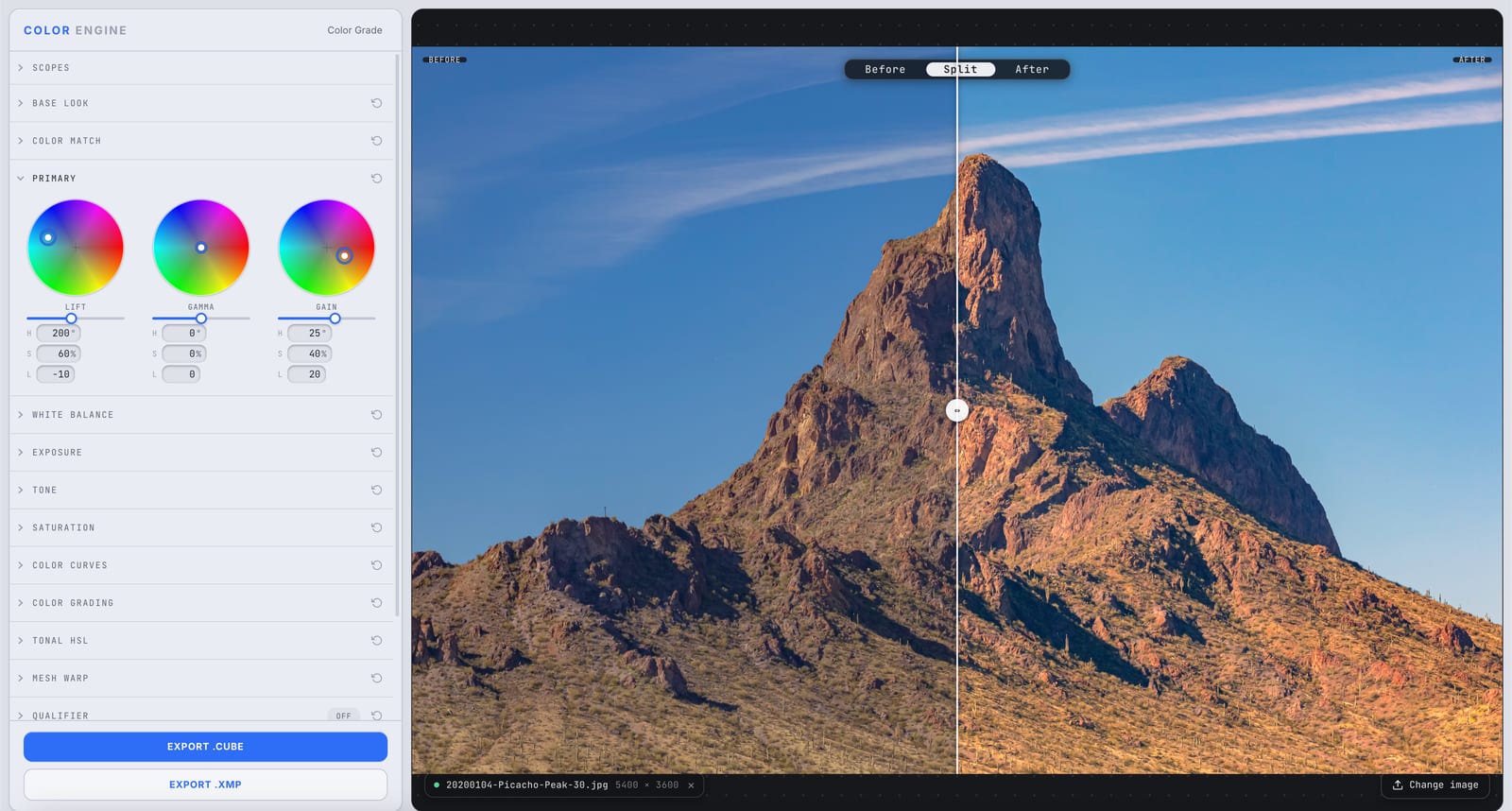
What it is
Primary is your foundation: three color wheels — Lift, Gamma, Gain — that adjust the color and level of the shadows, midtones, and highlights independently. Drag a wheel to push hue and strength; the H/S/L readouts dial it in precisely.
It's the corrective layer — get the image neutral and balanced here, then build the creative look on top with Color Grading and the rest.
The controls
Lift
The shadows and black point. Push color into the darks and raise or lower where black sits.
Gamma
The midtones — the broad middle where most of your subject lives — without dragging the extremes.
Gain
The highlights and white point. Push color into the brights and set where white lands.
H / S / L
Precise readouts under each wheel — hue and strength for the tint, luminance for the level — so a move is a number you can match across shots.
What to do with it
Where Color Match earns its place in a real grade.
Neutralize a cast across the range
Balance the shadows, mids, and highlights back to neutral when one tonal zone has drifted off-color.
Set black and white points with color
Lift the blacks and shape the highlights to define your range and its color in one move.
Warm or cool by zone, as correction
Nudge a zone's hue to fix lighting before you ever touch the creative grade.
Build a balanced foundation
Get the image clean and even here so Color Grading and curves behave predictably on top.
Field tips
- Balance on the scopes — get your neutrals neutral with Lift and Gain before you chase hue.
- Primary corrects; Color Grading styles. Do the correction here first.
The science
The part nobody else explains
Lift, gamma, gain — the three-way
Lift moves the shadow end (the black point), Gain moves the highlight end (the white point), and Gamma bends the middle. Together they let you place color and level independently in each tonal zone — the foundation of every grade.
Why primary comes before the look
Correct the balance first and every creative move on top behaves predictably. Skip it and you're styling on top of a cast you'll keep fighting.
Wheels, precisely
The H/S/L readouts mean a wheel move isn't just feel — you can match a number across shots, which is how a sequence stays consistent.
Primary vs Color Grading
Primary (Lift/Gamma/Gain) is the corrective three-way — balance the image. Color Grading (Shadows/Mids/Highlights/Global) is the creative tinting layer — build the look. Same idea, different jobs; use Primary first.
Frequently asked
Lift, gamma, gain — what do they mean?
Lift is the shadows (black point), gain is the highlights (white point), gamma is the midtones between them. Three zones, three wheels.
Primary vs Color Grading — which do I use?
Primary corrects and balances (lift/gamma/gain); Color Grading tints and styles (shadows/mids/highlights/global). Use Primary first, then build the look.
Should I balance before grading?
Almost always. A neutral, balanced foundation makes every creative move predictable.
Related features
Try Primary on your own shot
Build a look, match it across a set, and export a LUT or preset in minutes — free for 14 days, no installs.