Start from a look, not a blank slate
Base Look
Drop in a 3D LUT as your foundation — a film emulation, a creative look, a Color.io export — and grade on top of it. Base Look is the starting point everything else builds on, baked through to your final .cube or .xmp.
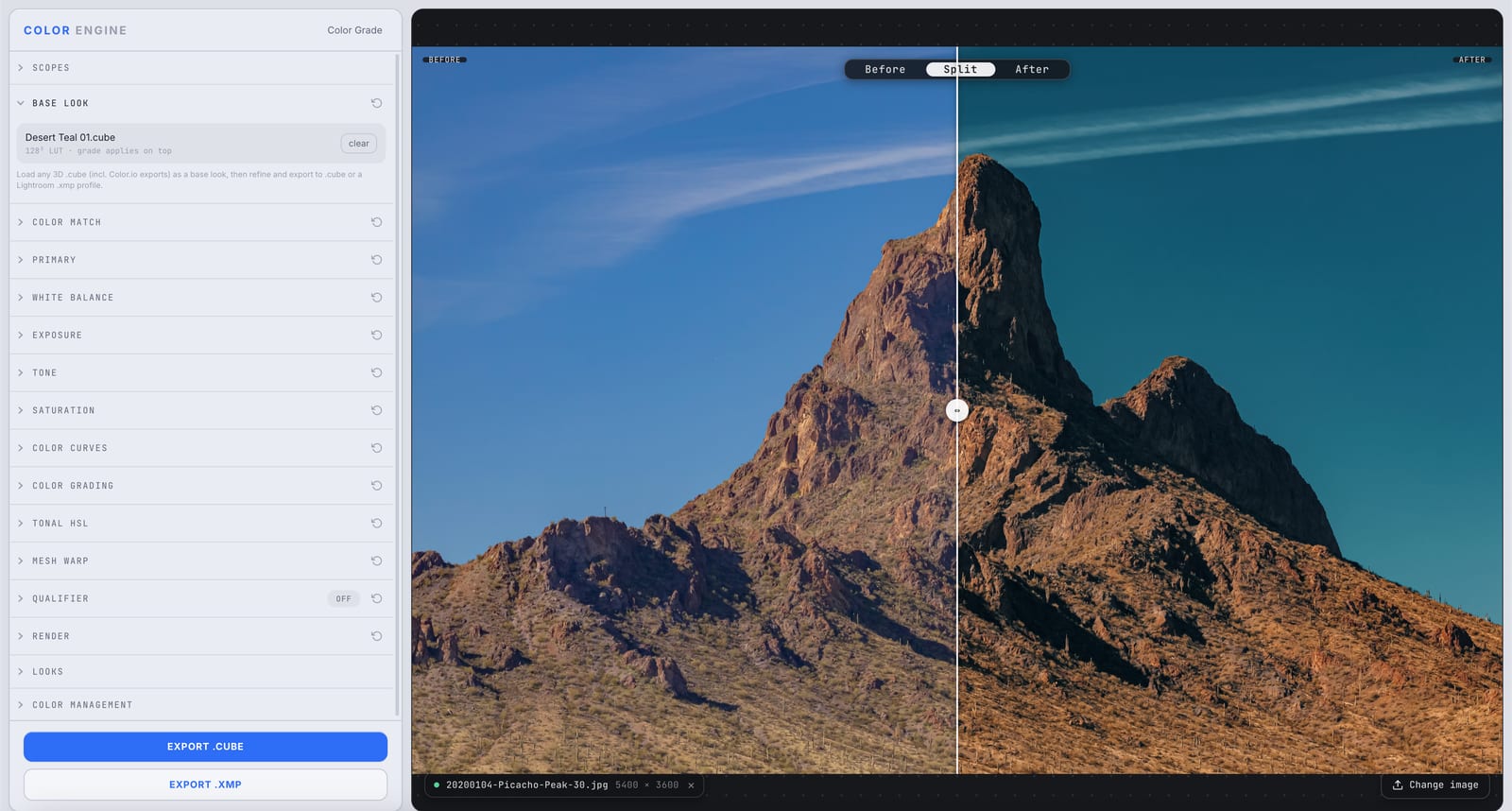
A base look, applied
A 3D LUT loaded as the foundation — everything else grades on top.
What it is
Base Look loads any 3D .cube LUT — a film stock, a creative look, an export from Color.io — as the foundation of your grade. Everything you do after (Color Match, curves, wheels, HSL) applies on top of it.
When you export, the base and your adjustments bake together into a single .cube or Lightroom .xmp, so the whole look travels as one file.
The controls
Import .cube LUT
Load any 3D .cube — including Color.io exports — as your base. Color Engine reads it as a lookup cube (e.g. 128³) and applies it first.
Grade on top
Color Match, curves, wheels, and HSL all stack on top of the base — you're refining a starting point, not building from scratch.
Clear
Drop the base and start clean any time.
What to do with it
Where Color Match earns its place in a real grade.
Start from a film emulation
Load a film-stock LUT as your base and tune from there instead of chasing the look by hand.
Build on a Color.io export
Bring a look you built elsewhere in as the foundation and refine it inside Color Engine.
Standardize a series
Apply one base LUT across a project so every shot shares a common foundation before per-shot tweaks.
Commit to a direction fast
Drop a stylized LUT onto corrected footage to lock a creative direction, then dial it in.
Field tips
- Set exposure and white balance before you load the base — most LUTs assume a sane starting point.
- The base bakes into your export, so what you preview is exactly what ships.
The science
The part nobody else explains
What a 3D LUT actually is
A 3D LUT is a lookup cube: it maps every input color straight to an output color, no math in between. A 128³ LUT defines that mapping at 128 steps per axis and smoothly interpolates the rest — which is how it encodes complex, non-linear looks a slider never could.
Why the base comes first
Loading the LUT first means every later adjustment operates on the already-transformed image — you're refining the look, not fighting it. Order matters: base, then grade.
It all bakes to one transform
Color Engine resolves the base plus your grade into a single export, so the whole pipeline collapses into one .cube or .xmp. The look is portable and deterministic — identical in any app.
A LUT, not a filter
A LUT is a precise, reproducible mapping, not an opacity-blended overlay. Load the same .cube anywhere and you get the same result — which is why it's the professional unit of exchange for looks.
Frequently asked
What LUT formats can I load?
3D .cube LUTs, including exports from Color.io and most grading tools.
Does my grade replace the base or stack on it?
It stacks. The base applies first; everything else refines on top, and they bake together on export.
Can I export the combined look?
Yes — the base plus your grade export as a single .cube or Lightroom .xmp.
Related features
Try Base Look on your own shot
Build a look, match it across a set, and export a LUT or preset in minutes — free for 14 days, no installs.